Opening Invoice Creation Tool
Opening Invoice Creation Tool
- Opening Invoice Creation Tool သည် (Purchase Invoice) ဝယ်ယူမှု သို့မဟုတ် (Sale Invoice) အရောင်းပြေစာများ၏ အချက်အလက်များကို သိမ်းလိုလျှင် အသုံးပြုပါသည်။
- Home > Accounting > Opening and Closing > Opening Invoice Creation Tool (သို့မဟုတ်) Search Box တွင် Opening Invoice Create Tool ဟုရိုက်ထည့်၍လည်း ဝင်၍ရပါသည်။

- Opening Balance ထည့်လိုသော Company အမည်ကို ရွေးပါ။
- Invoice Type တွင် (Purchase Invoice) ဝယ်ယူမှု (သို့မဟုတ်) (Sale Invoice) အရောင်းပြေစာ
- Create Missing Party ကို အမှန်ခြစ်ပါ။
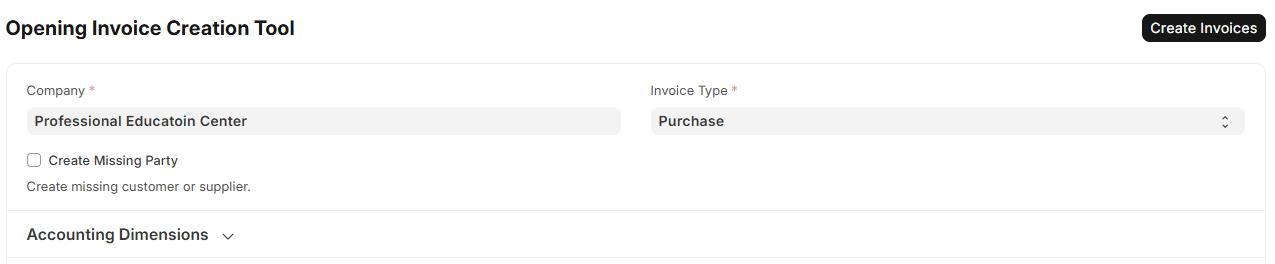
-
Invoice အချက်အလက်ထည့်သွင်းရန်။
a. Add Row ကိုနှိပ်ပါ။
b. Party တွင် ဖောက်သည်/ရောင်းချသူအား ရွေးနိုင်ပါသည် သို့မဟုတ် မရှိသေးပါက Create a new supplier / customer ကိုရွေးပါ။
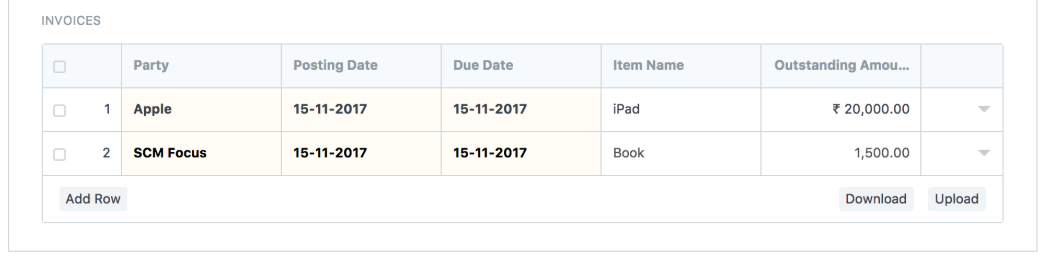
မှတ်ချက် = Invoice Type တွင် Sales ကိုရွေးထားပါက Party တွင် Customer ကိုရွေးရပါမည်။ Invoice Type တွင် Purchase ကိုရွေးထားပါက Party တွင် Supplier ကိုရွေးရပါမည်။
c. Posting Date တွင် ပြေစာထုတ်ပေးသည့် ရက်စွဲကိုရွေးပေးရပါမည်။
d. Due Date တွင် ပြေစာသက်တမ်းပြည့်မည့် ရက်စွဲကိုရွေးပေးရမည်။
e. Item Name ရိုက်ထည့်ပေးပါ။
f. Outstanding Amount တွင် ပေးရန်ကျ / ရရန်ကျန် ငွေပမာဏကို ရိုက်ထည့်ပါ။
g. ယခုထည့်သွင်းထားသော အချက်အလက်များကို Excel ဖြစ် Download လုပ်လိုပါက Download ကိုနှိပ်၍ရပါမည်။
h. အသင့်ပြုလုပ်ထားသော Excel File ဖြင့် Data Import ထည့်လိုလျှင် Upload ကိုနှိပ်၍ Excel File ကို ရွေးပါ။
i. Create Invoices ကိုနှိပ်ပါ။
j. Sale Invoice List ထဲတွင် Unpaid Status နှင့် ဖော်ပြပေးနေပါမည်။