Item Price ကို Excel တွင်ပြင်ပြီးအသစ်ထည့်သွင်းနည်း
-
ပထမဦးစွာ Data Import သို့သွားပါ။
-
Add Data Import ကိုနှိပ်ပါ။

-
Document Type တွင် Item Price ကိုရွေးပါ။
-
Import Type တွင် ထည့်သွင်းပြီးသား Data ကို Update လုပ်မည်ဆိုပါက Update Existing Records ကိုရွေးပါ။ အသစ်ထည့်မည်ဆိုပါက Insert New Records ကိုရွေးပါ။
-
ယခုရှိပြီးသား Item Price လေးကို Update လုပ်မှာဖြစ်တဲ့အတွက် Update Existing Records ကိုရွေးပါ။
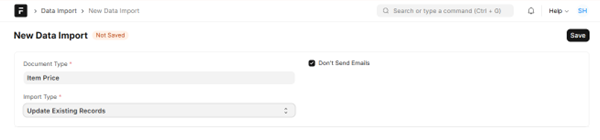
- Save ကိုနှိပ်ပါ။
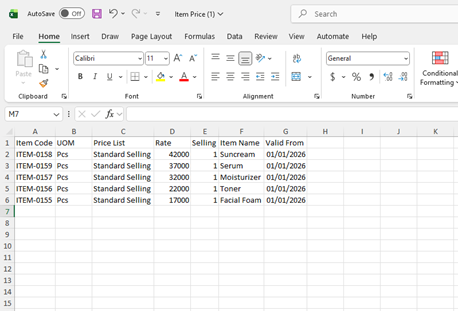
-
Excel တွင် မိမိပြင်လိုသောစျေးနှုန်းအား Rate တွင်ပြန်လည်သတ်မှတ်ပြင်ဆင်ပါ။
-
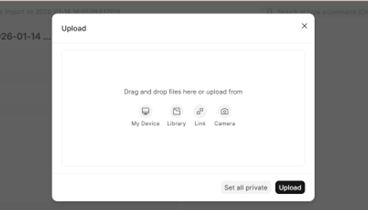
Import File မှ Attach လေးကိုနှိပ်၍ မိမိ Data ပြင်ထားသော Excel File လေးအားတွဲပေးပါ။
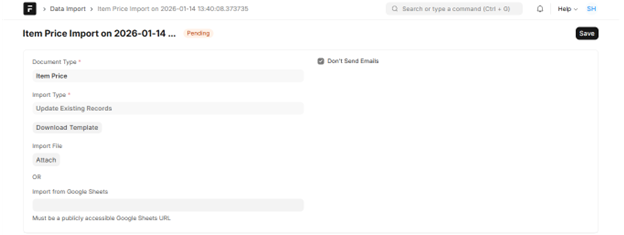
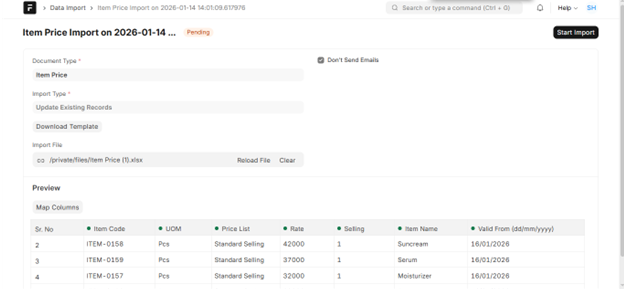
- Start Import လေးကိုနှိပ်ပါ။
-
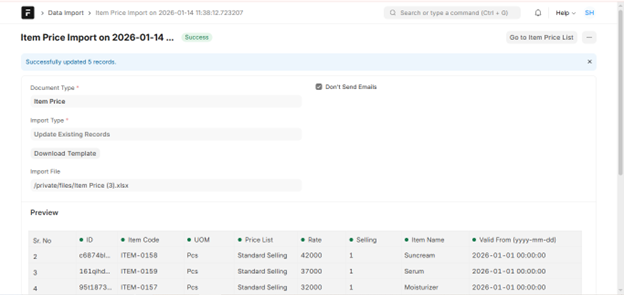
Import လေးသွင်းပြီးပါက Data Import ရဲ့ Status လေးကလဲ Success အဖြစ်ပြနေပါမည်။
-
ထည့်သွင်းလိုက်သည့် Item ၏ စျေးနှုန်းအသစ်များကို Item Price တွင် အောက်ပါအတိုင်း ပြောင်းလဲပြီး တွေ့ရပါမည်။

Last updated 4 months ago
Was this helpful?