ဝန်ထမ်းများ လုပ်ငန်း၏လိုအပ်ချက်အရ အပြင်သွားရသည့်အခါမျိုးများတွင် ဝန်ထမ်း၏အသုံးစရိတ် (ဥပမာ - Transportation Fees) များကို ကြိုထုတ်ပေးလိုက်ရခြင်းများအတွက် Employee Advance ကို ပြုလုပ်ပေးရပါမည်။
####Employee Advance ထည့်သွင်းရန်အတွက်
-
HR Module မှ Expense Claim ခေါင်းစဥ်အောက်တွင်ရှိသော Employee Advance ကိုနှိပ်ပါ။
-
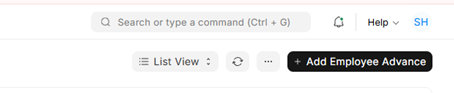
Add Employee Advance ကိုနှိပ်ပါ။
-
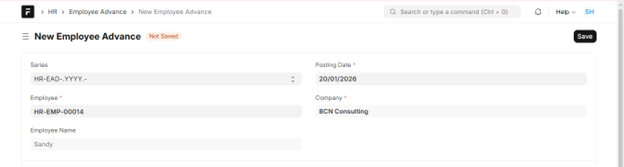
Employee Name ရွေးပေးပါ။
-
Posting Date တွင် စရိတ်ကြိုထုတ်မည့် ရက်ကိုရွေးပေးပါ။
-
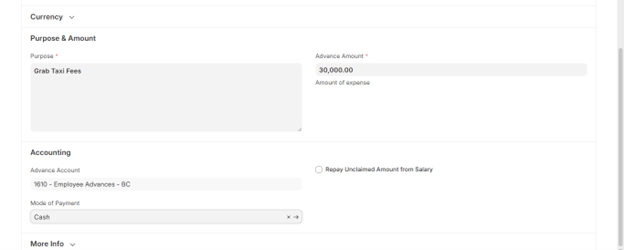
Purpose တွင် အကြောင်းအရာ ထည့်သွင်းပါ။
-
Amount တွင် ကြိုထုတ်ပေးလိုက်သော ပမာဏ ထည့်သွင်းပါ။
-
Mode of Payment တွင် Cash or Bank ရွေးပေးပါ။
-
Save ကိုနှိပ်ပါ။
-
Submit ကိုနှိပ်ပြီး Yes ပြုလုပ်ပါ။
Last updated 4 months ago
Was this helpful?