Gross Profit Report
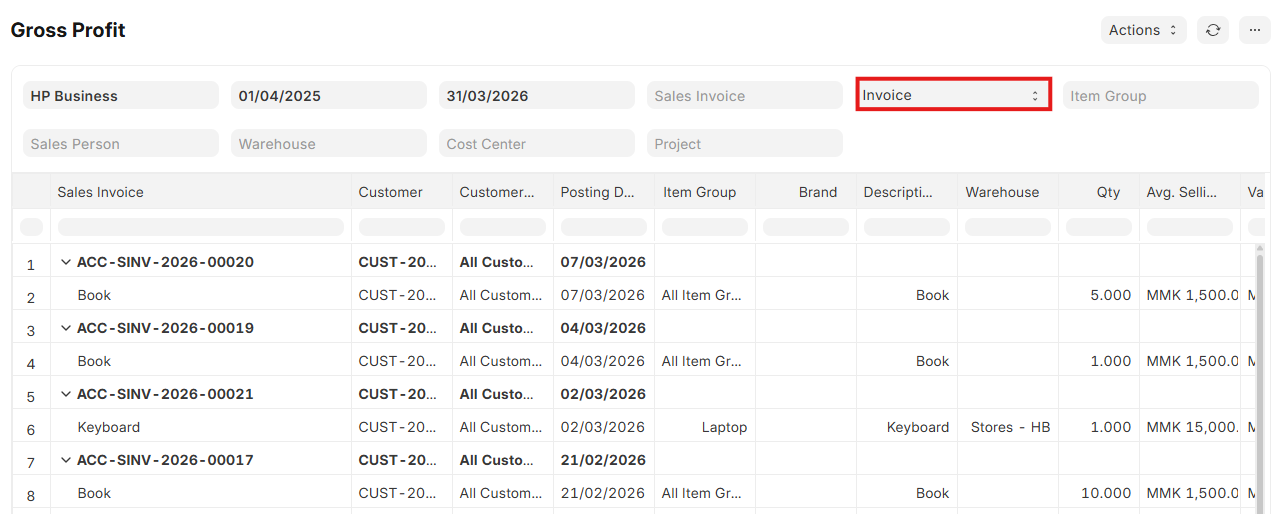
လုပ်ငန်းတွင်ရှိသော Item တစ်ခုချင်းစီ၏ အကြမ်းအမြတ်ကို သိလိုပါက Accounting အောက်တွင်ရှိသော Gross Profit Report ထဲတွင် ကြည့်ရပါသည်။
- Form Date နှင့် To Date နေရာတွင် မိမိသိလိုသော Date Range ကိုရွေးပြီးကြည့်လို့ရပါမည်။
- Group By နေရာတွင် မိမိကြည့်လိုသည့် အမျိုးအစားကိုရွေးပါ။
- Cost Center အလိုက် ကြည့်လိုပါက Cost Center ကိုရွေး၍ ကြည့်နိုင်ပါသည်။
- ထို Invoice တွင် ရောင်းသော Item ၏အရေအတွက်၊ ပျမ်းမျှရောင်းဈေးနှုန်း၊ ရောင်းဈေး၊ ဝယ်ဈေးနှင့် အကြမ်းအမြတ်များကို ဖော်ပြပေးပါမည်။
- Item Code ကိုရွေးချယ်ပြီး ကြည့်ပါက မိမိရွေးပြီးကြည့်သော Date Range အတွင်းရောင်းရသော Item များ၏ အရေအတွက်၊ ပျမ်းမျှရောင်းဈေး၊ ဝယ်ဈေးနှင့် အကြမ်းအမြတ်များကို ဖော်ပြပေးပါမည်။
Last updated 4 months ago
Was this helpful?