ERPNext တွင်အရောင်းအဝယ် Transaction များ၊ ငွေသားနှင့်ပတ်သတ်သည့်စာရင်းများ ထည့်သွင်းရာတွင် Payment Mode (Payment Method) အမျိုးမျိုးဖြင့်ငွေချေနိုင်ပါသည်။
ဥပမာ Payment Entry မှတဆင့် ငွေချေရာတွင် Payment အမျိုးအစားများ ဖြစ်သော Cash , Bank စသည်တို့ကို Mode of Payment တွင် သတ်ဆိုင်ရာ Cash Book Account များဖြင့် ချိတ်ဆက်၍ Payment Method များ ခွဲခြားသတ်မှတ်ထားနိုင်ပါသည်။
Mode of Payment များသတ်မှတ်မည်ဆိုပါက....
Accounting > Setup > Mode of Payment
- Add Mode of Payment ကိုနှိပ်ပါ။

- Edit in Full Form ကိုနှိပ်ပါ။
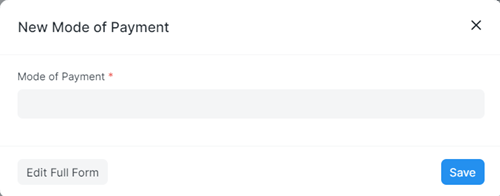
- Mode of Payment တွင် Payment Method Name ကိုထည့်ပါ။
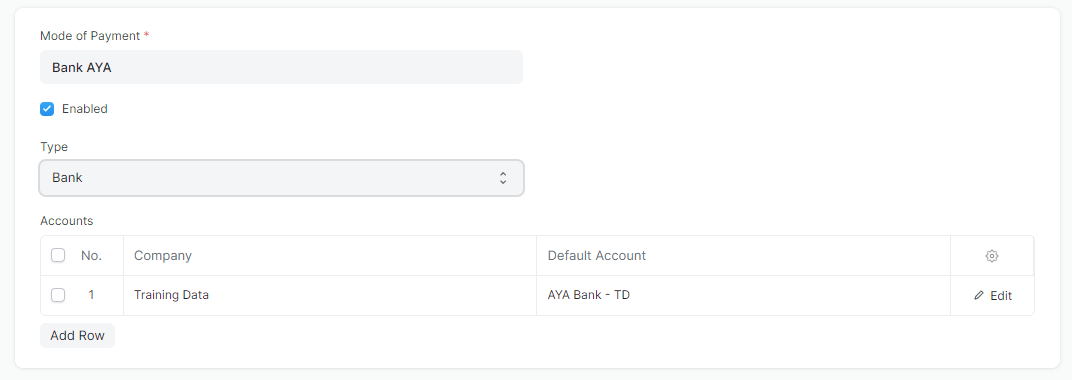
- Type တွင် Cash or Bank ကိုရွေးပါ။
- Accounts တွင် Chart of Account တွင်သတ်မှတ်ထားသော Cash(or)Bank Account ကိုရွေးပါ။
- Save ကိုနှိပ်၍ Mode of Payment များသတ်မှတ်နိုင်ပါသည်။
Last updated 4 months ago
Was this helpful?